Stop Throwing AI at Your Software Process. Start Strategically Placing It.
A practical framework for integrating AI into brownfield software development
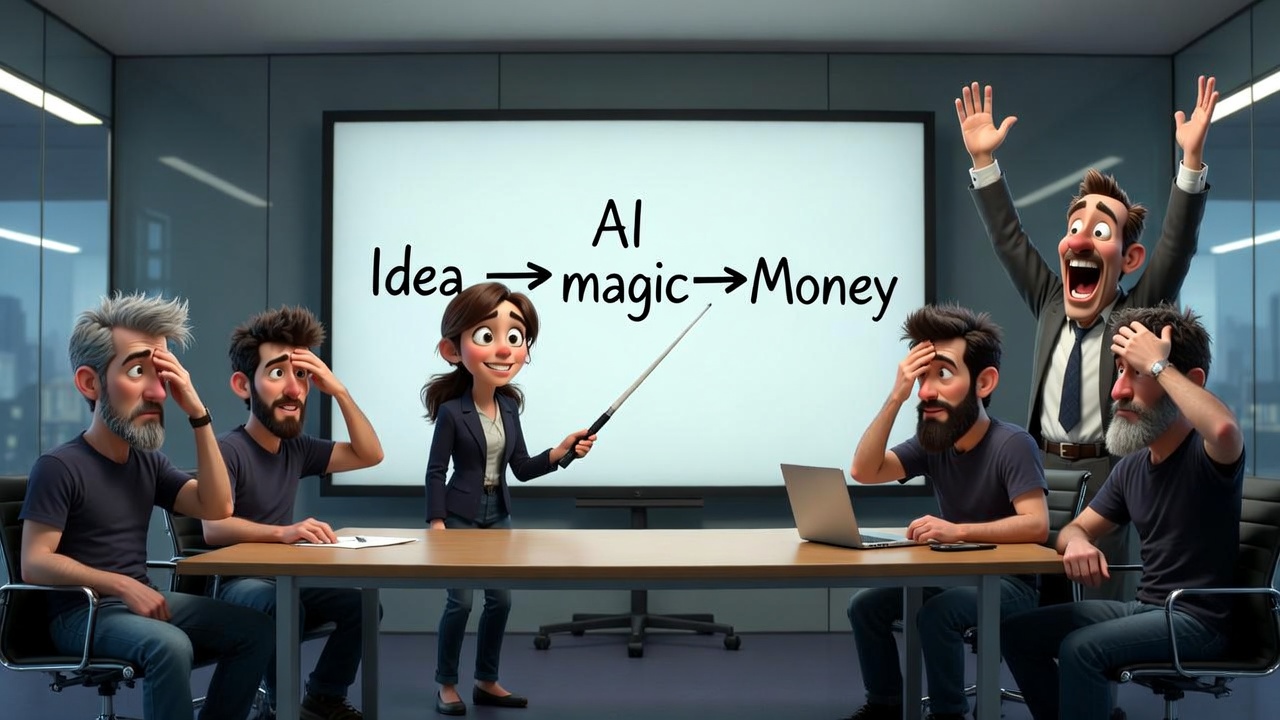
The CEO’s Napkin vs. Reality
I’ve sat in enough boardrooms to know the drill. Someone draws four boxes on a whiteboard:
Idea → Design → Develop → Deploy
Then the AI conversation starts, and those four boxes collapse into three:
Idea → ☁️ AI Magic ☁️ → Money

I get it. AI is exciting. The demos are impressive. But if you’ve ever managed a real software team — especially one maintaining systems that have been running for years — you know that napkin sketch is missing about 98% of what actually happens.
The reality of software development, particularly in brownfield environments (where you’re evolving existing systems, not building from scratch), looks more like a multi-phase gauntlet with quality gates, feedback loops, risk matrices, and enough stakeholders to fill a small theater.
In 2025/2026 the vast majority of companies are living in brownfield reality: legacy monoliths, technical debt, systems that are sometimes 10–20 years old that nobody wants to rewrite from scratch. Greenfield (clean-sheet new projects) is the exception, not the rule.
In greenfield, Copilot is awesome — a real rocket.
In brownfield? It’s a very fast and stubborn junior developer that you always have to review twice.
The latest research (arXiv:2511.02922, November 2025 replication & extension) clearly shows the so-called comprehension-performance gap in GenAI-assisted brownfield programming: developers with tools like Copilot finish tasks faster (less time, more tests passed — up to +50–80% in some metrics), but understanding of the legacy codebase does not improve at all. Zero difference in comprehension scores with or without AI. A new type of debt is born — comprehension debt: the code flies out like from a machine gun, but in a year or two nobody understands what is there and why. This is not hype — this is a real risk I have already seen in several projects, and DORA 2025 calls it the “amplifier effect”: AI amplifies what you already have. Solid foundations → rocket. Chaos and poor understanding → you just produce mess faster.
So where does AI actually fit?
Not everywhere. Not nowhere. But precisely, as a tool in specific phases, and as a skill requirement for specific roles.
And there’s a surprisingly elegant way to figure out exactly where: the Turtle Diagram.
Wait, What’s a Turtle Diagram?
If you’ve worked in automotive (IATF 16949) or quality management (ISO 9001), you already know this one. If not, here’s the 30-second version:
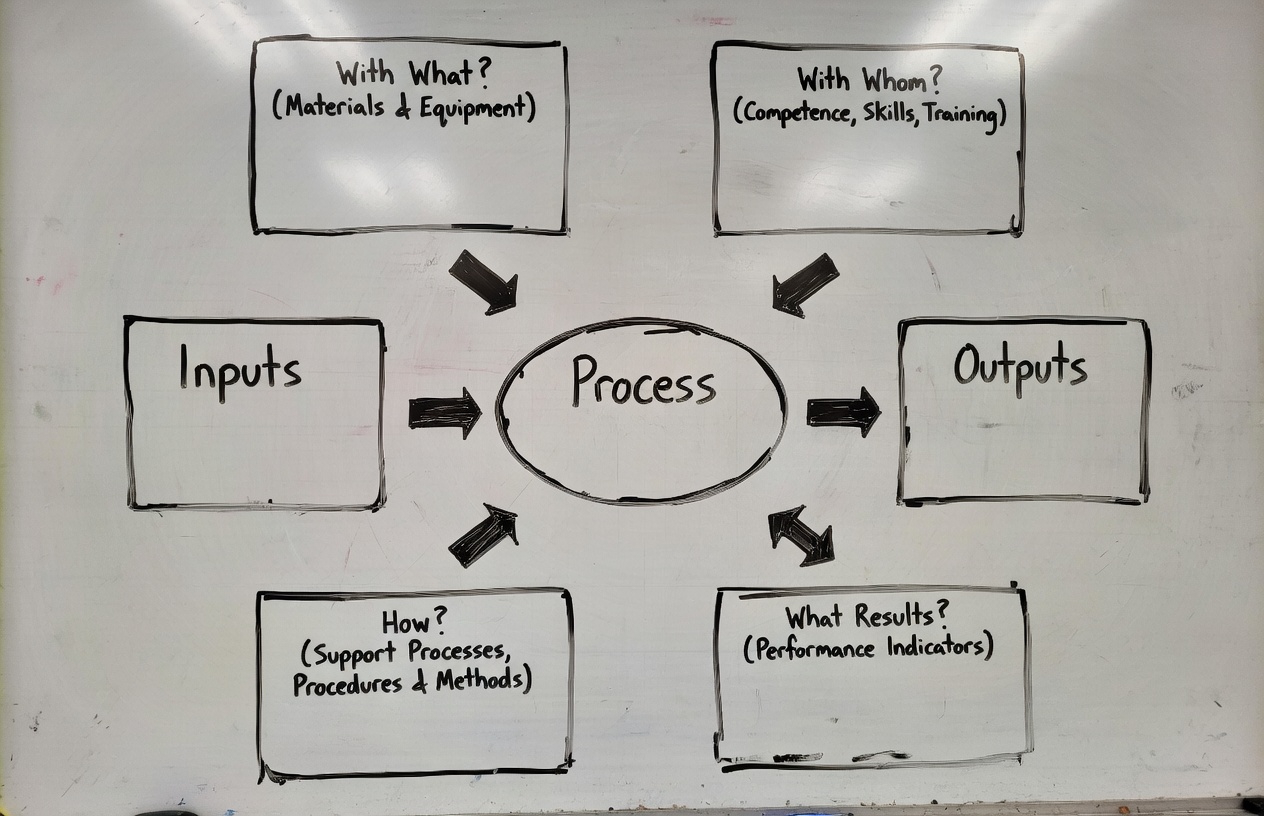
A Turtle Diagram is a process visualization tool shaped like — you guessed it — a turtle. The body is the process itself. The legs, head, and tail represent six dimensions:
| Element | Question | What It Covers |
|---|---|---|
| Inputs | What triggers the process? | Documents, requirements, data, requests |
| Outputs | What does the process produce? | Deliverables, artifacts, decisions |
| How | What procedures guide the work? | Methods, standards, workflows |
| With What | What tools and resources are used? | Software, infrastructure, AI tools |
| With Whom | Who does the work? | Roles, competencies, new AI skills |
| Results | How do we measure success? | KPIs, quality metrics, DORA metrics |
Here’s the key insight: AI is not a process. AI is a “With What.”
It’s a tool. A powerful one, but a tool nonetheless. And like any tool, it needs skilled operators (“With Whom”) and clear procedures (“How”) to deliver value.
When executives treat AI as a process — as the magic cloud between idea and money — they skip the part where you actually integrate it into your existing workflows. That’s why so many AI initiatives fail. Not because the technology is bad, but because nobody mapped it to the real process.
Disclaimer — because every organization and every project is different
Every organization and every project is different. This 8-phase model is not a rigid sacred cow — in one company it is a formal document with stamps and 14 signatures, in another it is a quick 15-minute meeting between the principal developer and the engineering manager ending with the statement: “You’re out of your mind, but let’s try it.” Apply it with common sense, adapt it to your context, and always consult with stakeholders and the team. This is not theory — these are frameworks I have tested and modified in real brownfield environments.
The Real Process: 8 Phases of Brownfield Software Development
Before we can place AI, we need to see the actual terrain. Here’s what a mature brownfield SDLC looks like — the kind you’ll find in any large organization maintaining systems that have been running for 3, 5, or 15 years:
Phase 1: Ideation & Strategic Triage
Every change starts here. Feature requests from business leaders. Bug reports from users. And the silent killer: technical debt that nobody scheduled but everyone feels.
The critical control is the triage meeting, where product owners and engineering leads assess business criticality vs. technical risk. Without it, teams invest in features that are fundamentally incompatible with the existing architecture.
🐢 Turtle Mapping:
- Inputs: Feature requests, bug reports, technical debt audits, stakeholder visions
- With What: Jira, Productboard, ServiceNow — and now, Generative AI for requirement synthesis
- With Whom: Product owners, engineering leads, business analysts — now needing AI literacy to evaluate AI-generated requirements
- How: Feasibility studies, ROI analysis, strategic alignment checks
- Results: Approved backlog items with clear success criteria
🤖 Where AI Fits: AI can draft initial requirement documents from stakeholder interviews (transcribed and summarized). It can analyze the existing backlog to identify duplicate requests or conflicting priorities. But the triage decision — the judgment call about what’s worth building — remains human. AI informs; humans decide.
Phase 2: Discovery & Technical Auditing
This is the phase that greenfield projects skip entirely. In brownfield, before writing a single line of code, you need to understand what you’re working with. It’s called “software archaeology” for a reason.
The team harvests artifacts from legacy systems, maps dependencies, and creates an “Inventory” — a semantic network that reveals how components relate, even when documentation is missing or wrong.
🐢 Turtle Mapping:
- Inputs: Legacy source code, existing documentation (often outdated), tribal knowledge
- With What: Dependency Finder, SonarQube, Augment AI for real-time architectural snapshots and blast-radius overlays
- With Whom: Enterprise architects, senior developers — now needing skills in AI-powered code analysis tools
- How: static analysis, code visualization
- Results: Technical baseline with quantified dependency chains
🤖 Where AI Fits: This is one of AI’s strongest use cases. Tools like Augment AI can generate architectural snapshots from codebases that no single human fully understands. AI can map dependency graphs, identify dead code, and estimate the “blast radius” of a proposed change across a distributed system.
Real-world example: AI can generate a dependency map from code that nobody has fully understood for years — but you still need a human to check whether it’s not hallucinating. (See Mark Russinovich’s LinkedIn post where AI disassembled 6502 machine code from a 1986 COMPUTE! magazine article, reconstructed the logic with accurate labels, and even found logic errors.)
Phase 3: Impact Analysis & Requirements Refinement
Requirements in brownfield can’t be defined in a vacuum. They must be mapped against existing constraints — the data contracts, the third-party APIs, the batch jobs that run at 2 AM and break if you change a column name.
🐢 Turtle Mapping:
- Inputs: Contract models, data semantics, external API specifications
- With What: Impact analysis tools (forward, backward, static, dynamic), AI-powered change impact estimation
- With Whom: System analysts, database administrators — now needing prompt engineering skills for AI-assisted analysis
- How: Risk probability matrices, micro-feedback loops
- Results: Finalized SRS with stakeholder consensus
🤖 Where AI Fits: AI can automate the tedious parts of impact analysis — scanning thousands of files to find every reference to a changing API contract, identifying downstream systems that consume a particular data format. It can generate risk matrices from historical defect data. But the judgment about acceptable risk? That’s still the architect’s call.
Phase 4: Architectural Design & Modernization Strategy
The big question in brownfield: sustain or modernize?
If you choose to modernize, patterns like the Strangler Fig (incrementally routing traffic to new components while the old system keeps running) or API-First Wrapping (putting a clean facade over messy legacy logic) become your best friends.
🐢 Turtle Mapping:
- Inputs: Technical baseline from Phase 2, business requirements from Phase 3
- With What: Architecture modeling tools, AI-assisted design review and pattern recommendation
- With Whom: Solution architects, tech leads — now needing experience evaluating AI-generated architectural proposals
- How: Bounded Contexts (DDD), hexagonal architecture, architecture review gates
- Results: Approved architecture with documented trade-offs and rollback plans
🤖 Where AI Fits: AI can suggest architectural patterns based on the codebase characteristics. It can generate initial design documents and identify potential architectural anti-patterns. But architecture is fundamentally about trade-offs, and AI still struggles with the kind of contextual reasoning that considers organizational politics, team capabilities, and business timelines simultaneously.
Phase 5: Implementation & Development Discipline
In brownfield, “implementation” means more refactoring and integration than net-new coding. Developers work within the established patterns of the legacy codebase — the “project context.”
🐢 Turtle Mapping:
- Inputs: Technical specifications, pattern libraries, project context
- With What: IDEs, version control (Git), GitHub Copilot, Claude, AI code review tools, AI-powered refactoring assistants
- With Whom: Developers — now needing skills in AI pair programming, prompt crafting for code generation, and critical evaluation of AI-generated code
- How: Coding standards, branching strategies (GitFlow vs. trunk-based), peer reviews
- Results: Code passing unit tests, meeting coverage thresholds and maintainability scores
🤖 Where AI Fits: This is the phase most people think about when they say “AI in software development.” And yes, tools like Claude Code are genuinely useful here — especially for boilerplate code, test generation, and navigating unfamiliar legacy codebases. But the risk is real: AI-generated code that looks correct but introduces subtle bugs in legacy integration points. The new essential skill: code review of AI output — treating Copilot like a junior developer whose work always needs review.
Phase 6: Continuous Integration & Testing
Testing in brownfield is regression management. The goal: verify that your change doesn’t break existing business logic that’s been running for years.
🐢 Turtle Mapping:
- Inputs: Test automation pyramid (unit → integration → E2E), legacy test suites
- With What: Ranorex (legacy desktop), Selenium, Playwright, HPE UFT, AI-powered test generation and smart regression selection
- With Whom: QA engineers, SDET — now needing skills in AI test orchestration and interpreting AI-selected regression suites
- How: Build failure triage protocols, regression stability gates
- Results: Zero critical defects in core workflows, all smoke tests passing
🤖 Where AI Fits: AI shines at smart regression selection — analyzing code changes and historical defect patterns to determine which tests actually need to run, reducing a 4-hour regression suite to 45 minutes. Agents like Claude Code or Copilot work great for preparing test scripts. Tests should be deterministic based on fixed input data. The AI agent is activated only when deterministic tools fail (e.g., when the software evolves or you need to interpret an error and find its root cause). In my opinion there is huge potential for productivity growth here — but only if the QA engineer knows which tests are truly business-critical.
Phase 7: Deployment & Release Management
Deployment in brownfield requires decoupled delivery to manage risk. You’re not deploying to a clean environment; you’re deploying into a living system.
🐢 Turtle Mapping:
- Inputs: Validated build artifacts, environment configurations
- With What: CI/CD (GitHub Actions, Jenkins), Internal Developer Portals, AI-powered deployment risk scoring
- With Whom: DevOps/SRE teams — now needing skills in interpreting AI risk assessments and configuring AI-driven rollback triggers
- How: Canary rollouts, blue-green deployments, feature toggles, deployment readiness checklists
- Results: Successful staging deployment, verified environment configuration, Go/No-Go decision
🤖 Where AI Fits: AI can score deployment risk by analyzing the change’s blast radius, the time of day, historical deployment failure patterns, and current system load. It can automate canary analysis — detecting anomalies in the 5% canary population before full rollout. It also dramatically shortens the time needed to prepare release notes, business communication, audio guides, and presentations — from hours to just 15 minutes, enabling materials that there simply wouldn’t be time for otherwise.
Phase 8: Operations & Maintenance
After deployment, software enters continuous monitoring. This is where the feedback loop closes — production data informs the next cycle of ideation.
🐢 Turtle Mapping:
- Inputs: Logs, metrics, traces (the “Three Pillars of Observability”), user feedback
- With What: Observability platforms, AIOps for anomaly detection, predictive alerting, automated root cause analysis
- With Whom: SRE teams, on-call engineers — now needing skills in AIOps configuration and AI-assisted incident response
- How: Bug lifecycle management, Build-Measure-Learn cycle, Post-Implementation Reviews
- Results: MTTR, error rates, feature adoption rates, NPS scores
🤖 Where AI Fits: AIOps is arguably the most mature AI application in the SDLC. AI excels at pattern recognition in telemetry data — detecting anomalies that humans would miss in the noise of millions of log lines. Predictive maintenance (identifying components likely to fail based on historical patterns) is a genuine game-changer for legacy systems.
The Turtle Diagram View: AI Across the Entire Process
“With What” — AI as a Tool (by phase)
| Phase | AI Tool Application |
|---|---|
| 1. Ideation | Requirement synthesis, backlog deduplication |
| 2. Discovery | Dependency mapping, architectural snapshots |
| 3. Analysis | Change impact estimation, risk matrices |
| 4. Design | Pattern recommendation, design review |
| 5. Implementation | Code generation, AI pair programming, refactoring |
| 6. Testing | Smart regression selection, test generation |
| 7. Deployment | Risk scoring, canary analysis |
| 8. Operations | AIOps, anomaly detection, predictive maintenance |
“With Whom” — New Skills Required
| Role | New AI Skill |
|---|---|
| Product Owner | Evaluating AI-generated requirements, AI-assisted prioritization |
| Architect | Validating AI architecture maps, AI-augmented design review |
| Developer | AI pair programming, reviewing AI-generated code, prompt crafting + AI skill creation and derivatives. Developers create mini-systems that increase efficiency across the organization and project — for example, an organization-wide marketplace of skills and MCP servers that dramatically speeds up onboarding. |
| QA Engineer | AI test orchestration, interpreting AI regression selection |
| DevOps/SRE | AIOps configuration, AI-driven rollback management |
| Engineering Manager | AI ROI assessment, building AI-augmented team capabilities, AI-augmented reporting and better project understanding. In my case: I built tools that turn Jira/Asana, Slack, repo and meeting notes into a precise project journal. A separate agent analyzes the situation every day and warns me about risks and opportunities. Not every team member is a communication master, and I’m not always as focused as I’d like to be. My agent is pedantic and stubborn — it will list every warning or explain a technical concept I haven’t encountered yet. |
“How” — New Procedures Needed
| Procedure | Purpose |
|---|---|
| AI Output Review Policy | Mandatory human review of all AI-generated artifacts |
| AI Tool Evaluation Framework | Structured approach to selecting and validating AI tools |
| AI Skill Development Plan | Training roadmap for each role’s AI competencies |
| AI Ethics & Bias Guidelines | Guardrails for AI use in decision-support |
The 70/20/10 Rule — Where AI Investment Fits
Organizations typically allocate capacity using the 70/20/10 rule:
- 70% — Core operations, feature work
- 20% — Technical debt repayment, infrastructure maintenance
- 10% — Learning, experimentation, innovation
AI integration spans all three:
- 70%: AI tools embedded in daily workflows (Copilot, AIOps)
- 20%: AI-assisted technical debt analysis and modernization — this can be automated: an agent analyzes system logs, detects clusters of inefficiency or user problems, finds the common denominator and performs the first iteration of RCA; then the developer gets a tangible backlog item instead of vague user stories from management meetings saying “something is broken in the product”.
- 10%: Experimenting with emerging AI capabilities (agentic AI, autonomous testing… going bananas — banana IKEA card mention 😄)
Don’t make the mistake of putting AI entirely in the 10% “innovation” bucket. The real ROI comes from the 70% — the everyday tools that make existing work faster and more reliable.
The Bottom Line
If there’s one thing I want you to take from this article, it’s this:
AI is a “With What,” not a “Process.”
It’s a tool that belongs in specific boxes of the Turtle Diagram — alongside your IDEs, your CI/CD pipelines, your observability platforms. And like any tool, it requires skilled operators (“With Whom”) and clear procedures (“How”) to deliver value.
The executives who treat AI as the entire cloud between “Idea” and “Money” will waste budgets and burn teams. The ones who methodically place AI into each phase of their actual process — with clear use cases, skill requirements, and success metrics — will build organizations that are genuinely more effective.
Stop throwing AI at your process. Start placing where it matters most.
Krzysztof Sajna is an Engineering Manager who has spent 20 years navigating the intersection of hardware engineering, software development, and quality management. He writes about the practical realities of technology adoption for teams that build and maintain real systems — a jack of all trades with humility: I obsessively dive into any topic, quickly reach a level where I can move freely in it, but I know I won’t surpass the masters after a week of intense learning. At least I know what questions to ask and whom to ask.
Follow on X (@kasajna) | Read more on sajna.space